
Auswirkungsbewertung
Footprint Score in den beiden repräsentativsten Kontexten.
22 Scans · letzter Scan vor 2 Wochen
Homepage-Score
Auswirkung auf der öffentlichen Startseite
v2.9.0 · 2 Scans · Konsolidierte Bewertung über 90 Tage · 1 Versionen
Was bei jedem Seitenaufruf hinzukommt
- Zusätzliche Zeit
- 0 ms
- Zusätzlicher Speicher
- 0.0 MB
- SQL-Abfragen
- +1
- CSS/JS-Dateien
- +0
- Externe Aufrufe
- 0
Admin-Score
Auswirkung im WordPress-Admin
v2.9.0 · 5 Scans · Konsolidierte Bewertung über 90 Tage · 3 Versionen
Was bei jedem Seitenaufruf hinzukommt
- Zusätzliche Zeit
- 13 ms
- Zusätzlicher Speicher
- 0.0 MB
- SQL-Abfragen
- +1
- CSS/JS-Dateien
- +1
- Externe Aufrufe
- 0
Über
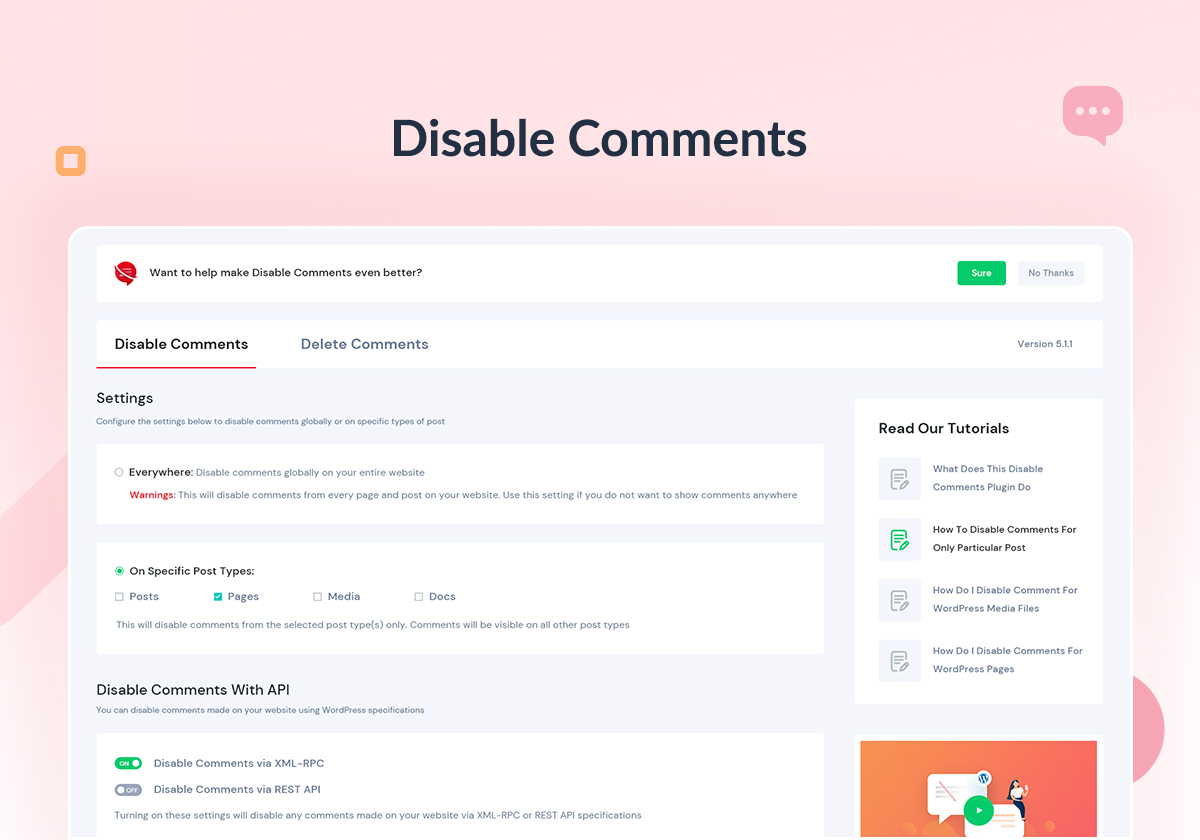
Enable/Disable comments on any WordPress content (Pages, Posts, or Media) to stop spammers. WP-CLI, XML-RPC & REST-API support to stop spam comments.
Mehr lesen Weniger anzeigen
Override all comments-related settings throughout your website & manage your comments just the way you want.
Choose which posts, pages or media should allow comments from site visitors & configure Disable Comments accordingly
Have multiple websites? Get rid of irrelevant comments on the entire network using Disable Comments Plugin
Bitte entferne alle bestehenden Kommentare von deiner Website, bevor du diese Einstellung anwendest, andernfalls können diese Kommentare (abhängig vom Theme) dennoch für den Besucher sichtbar sein. Du kannst das Kommentare-Entfernen-Werkzeug benutzen, um jeden Kommentar von deiner Website zu löschen.
AMAZING USER FRIENDLY INTERFACE
Easily configure your comment-related settings with an amazing and attractive app-like user interface.
WP-CLI COMMANDS TO DISABLE COMMENTS
Use WP-CLI control for comment-related settings to disable comments on posts, pages, attachments or everywhere on your website.
GET STARTED WITH QUICK SETUP WIZARD
Use the quick setup wizard after activating the plugin to instantly configure comment-related settings for your WordPress website.
DISABLE COMMENTS ON DOCS
Instantly disable comments on your documentation pages or WordPress knowledge base with a single click.
DELETE CERTAIN COMMENT TYPE(S)
Permanently delete certain comment types from your WordPress website including WooCommerce product reviews as well as generic comments.
DISABLE COMMENTS VIA XML-RPC And REST API
Block any comments made on your WordPress website via XML-RPC specification and REST API.
Wichtiger Hinweis: Benutze dieses Plugin, wenn du keine Kommentare auf deiner Website haben möchtest (oder bei speziellen Inhaltstypen). Benutze es nicht, wenn du Kommentare nur für ausgewählte Beiträge deaktivieren möchtest – WordPress erlaubt dies nativ. Wenn du nicht weißt, wie du Kommentare bei ausgewählten Beiträgen deaktivieren kannst, findest du in den FAQ entsprechende Hinweise.
Falls du Fehler bemerkst oder Vorschläge hast, benutze bitte das Support-Forum des Plugins. Fehler können nicht behoben werden, solange diese mir nicht bekannt sind! Häufige Probleme findest du in den in den FAQ.
Du möchtest mithelfen? Hier findest du das GitHub-Entwicklungs-Repository.
Eine Must-Use-Version des Plugins ist ebenso verfügbar.
Ein Teil des Pluginverhaltens kann von Website-Administratoren und Plugin-/Theme-Entwicklern mittels Code verändert werden:
Definiere DISABLE_COMMENTS_REMOVE_COMMENTS_TEMPLATE und setze es auf false, um zu verhindern, dass das Plugin das Kommentartemplate des Themes mit einem leeren ersetzt.
Define DISABLE_COMMENTS_ALLOW_DISCUSSION_SETTINGS and set it to true to prevent the plugin from hiding the Discussion settings page.
Diese Definitionen können entweder in der wp-config.php– der Installation oder in der functions.php-Datei des Themes gemacht werden.
DIESES PLUGIN WIRD JETZT GEPFLEGT VOM TEAM WPDeveloper.
For documentation and tutorials go to our Documentation
Videoanleitungen findest du in unserer YouTube-Wiedergabeliste
Join our Facebook Group
If you love Disable Comments, rate us on WordPress
For more information about features, FAQs, and documentation, check out our website at Disable Comments
Consider checking out our other WordPress solutions & boost your WordPress website:
🔝 Essential Addons For Elementor: Most popular Elementor addons with 2 million+ happy users & 95+ widgets & ready blocks
🔔 NotificationX – Best Social Proof & FOMO Marketing Solution to increase conversion rates.
🔗 BetterLinks: Latest best WordPress link management plugin for link shortening, tracking & analyzing.
📄 EmbedPress: EmbedPress lets you embed anything including videos, images, posts, audio, maps and upload PDF, DOC, PPT etc.
☁ Templately: 6000+ Free templates library for Elementor & Gutenberg along with the cloud collaboration for WordPress.
📚 BetterDocs: Best Documentation & Knowledge Base Plugin for WordPress reduce manual support tickets & improve user experience.
⏰ SchedulePress: Advanced editorial calendar with WordPress Post Scheduling, Social Sharing, Missed scheduled alerts, and more.
⚡ Flexia: Most lightweight, customizable & multi purpose theme for WordPress.
Visit WPDeveloper to learn more about how to do better in WordPress with Help Tutorial, Tips & Tricks.
The plugin build compiles assets/js/disable-comments.js from src/disable-comments.js with Babel and assets/css/style.css from assets/scss/style.scss with Sass, using Grunt. These sources are not included in the plugin zip. Other first-party JavaScript and CSS files in assets/ are maintained directly.
Both the sources and the build configuration live in the GitHub development repository. To build them yourself:
npm install
npm run build
Bundled third-party assets
The Select2, pagination.js, and SweetAlert2 JavaScript/CSS distributions are bundled separately from the Grunt build. Their full license notices are in assets/licenses/. The DM Sans webfont notice and SIL Open Font License 1.1 are in assets/fonts/OFL.txt. The plugin license is in LICENSE.txt.
Disable Comments connects to one external service, and only if you opt in.
WPInsight is WPDeveloper’s usage-analytics service. We use it to learn which WordPress versions, PHP versions, plugins and themes people run alongside Disable Comments, so we can keep the plugin compatible with them.
The „Still Seeing a Comment Form?“ check on the plugin’s settings page also requests pages of your own site to check what your theme outputs. Those requests go to your own site only and send nothing to a third party.
Beschreibung veröffentlicht von WPDeveloper auf WordPress.org, lizenziert unter GPL-3.0-or-later.
Screenshots
Screenshots veröffentlicht von WPDeveloper auf WordPress.org, lizenziert unter GPL-3.0-or-later.


Historie nach Version
Versionsdetails anzeigen (3 Versionen)
Historie nach Version
Versionsdetails anzeigen (3 Versionen)
Wie sich das Plugin von Version zu Version entwickelt.
| Version | Homepage | Admin | Letzter Scan |
|---|---|---|---|
| v2.9.0 | 2 Scans | 2 Scans | vor 2 Wochen |
| v2.8.0 | — | 1 Scan | vor 2 Monaten |
| v2.7.0 | 8 Scans | 2 Scans | vor 3 Monaten |
Scan-Verlauf
Einzelnes Scan-Protokoll anzeigen (16 Scans)
Scan-Verlauf
Einzelnes Scan-Protokoll anzeigen (16 Scans)
| Datum | Version | Kontext | Score | Bewertung | Zeit | Speicher |
|---|---|---|---|---|---|---|
| vor 2 Wochen | v2.9.0 | Homepage | 100/100 | A | 0 ms | 0.0 MB |
| vor 2 Wochen | v2.9.0 | Admin | 100/100 | A | 13 ms | 0.0 MB |
| vor 3 Wochen | v2.9.0 | Admin | 100/100 | A | 13 ms | 0.0 MB |
| vor 3 Wochen | v2.9.0 | Homepage | 100/100 | A | 0 ms | 0.0 MB |
| vor 1 Monat | v2.9.0 | messages.page_type.custom | 99/100 | A | 0 ms | 0.0 MB |
| vor 2 Monaten | v2.8.0 | Admin | 100/100 | A | 0 ms | 0.0 MB |
| vor 3 Monaten | v2.7.0 | Admin | 95/100 | A | 188 ms | 2.0 MB |
| vor 3 Monaten | v2.7.0 | Admin | 100/100 | A | 0 ms | 0.0 MB |
| vor 3 Monaten | v2.7.0 | Homepage | 100/100 | A | 0 ms | 0.0 MB |
| vor 3 Monaten | v2.7.0 | Homepage | 100/100 | A | 0 ms | 2.0 MB |
| vor 3 Monaten | v2.7.0 | Homepage | 95/100 | A | 0 ms | 0.0 MB |
| vor 3 Monaten | v2.7.0 | Homepage | 97/100 | A | 57 ms | 2.0 MB |
| vor 3 Monaten | v2.7.0 | Homepage | 100/100 | A | 0 ms | 0.0 MB |
| vor 3 Monaten | v2.7.0 | Homepage | 100/100 | A | 31 ms | 0.0 MB |
| vor 3 Monaten | v2.7.0 | Homepage | 99/100 | A | 31 ms | 0.0 MB |
| vor 3 Monaten | v2.7.0 | Homepage | 100/100 | A | 3 ms | 0.0 MB |