

Noch nicht genug Scans für eine Bewertung (1 erhalten).
Über
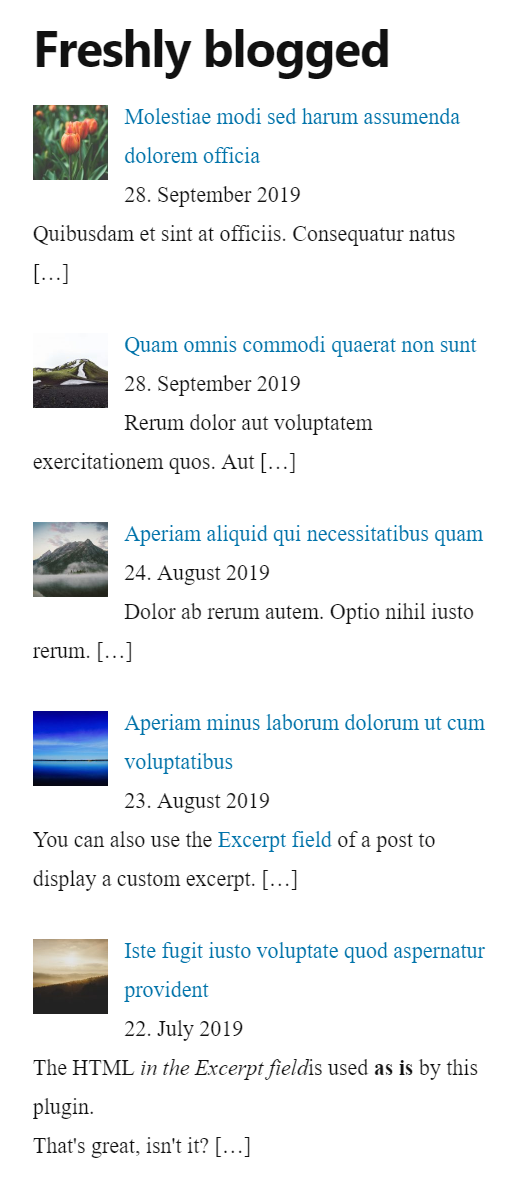
Auflisten der letzten Beiträge mit Beitragstitel, Vorschaubild, Textauszug, Autor, Kategorie, Datum und mehr!
Although the plugin is built only for widget areas users reported that it works in Elementor and works in Oxygen. Whether it runs in other page builders is unknown. Please let me know in which page builder you were able to use the plugin successfully.
The plugin does not collect any personal data, so it is ready for EU General Data Protection Regulation (GDPR) compliance.
Mehr lesen Weniger anzeigen
No huge widget with hundreds of options. This plugin is based on the well-known WordPress default widget ‚Recent Posts‘ and extended to display more information about the posts like e.g. thumbnails, excerpts and assigned categories. And it provides more options to build custom-taylored posts lists.
The thumbnails will be built from the featured image of a post or of the first image in the post content. If there is neither a featured image nor a content image then you can define a default thumbnail.
You can set the width and height of the thumbnails in the list. The thumbnails appear left-aligned to the post titles in left-to-right languages. In right-to-left languages they appear right-aligned.
If you want to list custom post types with the featured image, please check out our plugin Ultimate Post List Pro.
You want to test Recent Posts Widget With Thumbnails before installing on your site? Try it out on your individual and free playground site and click here.
Some users published video tutorials on YouTube:
The plugin considers the output of actions hooked on:
To design the list and its items, you can use these CSS selectors:
.rpwwt-widget: the element which contains the post list
.rpwwt-widget ul: the list which contains the list items
.rpwwt-widget ul li: the list item in the list
.rpwwt-widget ul li.rpwwt-sticky: the list item of a sticky post
.rpwwt-widget ul li a: link in the list
.rpwwt-widget ul li a img: linked image
.rpwwt-widget ul li a span.rpwwt-post-title: the post title
.rpwwt-widget ul li div.rpwwt-post-author: the post author
.rpwwt-widget ul li div.rpwwt-post-categories: the post category list
.rpwwt-widget ul li div.rpwwt-post-date: the post date
.rpwwt-widget ul li div.rpwwt-post-excerpt: the post excerpt
.rpwwt-widget ul li div.rpwwt-post-excerpt .rpwwt-post-excerpt-more: the "more" text following the excerpt.
.rpwwt-widget ul li div.rpwwt-post-comments-number: the number of comments
Sprachen
The user interface is available in several languages.
Starting from version 7.1.0 the handling for translations are moved to translate.wordpress.org.
Please help to translate into more languages, or you can re-work on the current translations if you think it’s needed.
If you have done your translation, please leave a comment in the plugin’s support forum. I’ll take care of the review and approval.
Beschreibung veröffentlicht von Kybernetik Services auf WordPress.org, lizenziert unter GPL-2.0-or-later.
Tags
featured image
recent posts
sidebar
thumbnails
widget
Screenshots
Screenshots veröffentlicht von Kybernetik Services auf WordPress.org, lizenziert unter GPL-2.0-or-later.
Alternativen in derselben Kategorie
Weitere Plugins der Kategorie media, von der Community gemessen, vom leichtesten zum schwersten sortiert.
Noch nicht genug Scans für eine Bewertung (3 erhalten).
Noch nicht genug Scans für eine Bewertung (3 erhalten).
Noch nicht genug Scans für eine Bewertung (1 erhalten).
Noch nicht genug Scans für eine Bewertung (3 erhalten).
Noch nicht genug Scans für eine Bewertung (2 erhalten).