




Noch nicht genug Scans für eine Bewertung (3 erhalten).
Über
🥇 A Post Grid plugin for WordPress blogs, news, and magazine websites
📄 Display your blog posts, pages, and custom post types with Post Grids, Post Lists, Post Sliders, Post Carousels, Post Modules, and more.
💕 Built by WPXPO, used by thousands of websites
📞 Dedicated support team ready to help
😲 View Demo | 🔥 PostX Pro | 📃 Starter Templates | 📦 All Blocks
PostX is a post grid plugin for WordPress that helps you build news, magazine, and blog layouts in the block editor. Display posts in customizable grids and lists, start with free templates and patterns, or choose PostX Pro for additional designs and advanced features.
Mehr lesen Weniger anzeigen
The free version includes 35 Gutenberg blocks, 24+ patterns, 30+ templates, and 5 starter sites. These provide a starting point for designing your blog within the WordPress editor.
✅ Post Grid: Choose from seven post grid blocks to display articles in grid-based sections.
✅ Post List: Use four post list blocks to arrange articles in list formats.
✅ Post Slider and Post Module: Show posts in two slider blocks and two module blocks.
✅ News Ticker: Display headlines in a vertical or horizontal ticker.
✅ Search: Add an Ajax-powered search block to help visitors find posts.
✅ Advanced Filter: Let readers filter posts by category, tag, author and order without a page reload.
✅ Pagination: Add Load More, numeric, or next/previous navigation to post blocks.
✅ Menu: Build navigation menus with the Menu block.
✅ Taxonomy, Dark/Light and YouTube Gallery: List categories and tags, add a dark mode switch, and show videos from a YouTube channel or playlist.
✅ Row and Wrapper: Structure page sections and group related blocks.
✅ Heading and Image: Add section titles and images to your layouts.
✅ List and Button Group: Present lists and add buttons that guide readers to another page.
✅ Image Gallery: Display multiple images together in a gallery.
✅ Accordion: Place supporting content inside expandable sections.
✅ Tabs: Organize content into separate tabs.
✅ Star Rating: Display a rating alongside your content.
✅ Social Icons: Add links to your social profiles.
✅ Table of Contents: Help readers jump to headings within longer posts.
✅ Dynamic Site Builder: Create custom home, single-post, archive, category, tag, author, search, date and 404 templates, plus headers and footers with display conditions.
✅ Dynamic Content: Insert post data such as excerpts, dates, and author names into PostX blocks.
✅ Custom Font: Upload custom fonts and use them in PostX blocks with typography controls.
✅ Saved Templates: Create unlimited reusable templates by converting Gutenberg block designs into shortcodes.
✅ Page Builder Integrations: Reuse designs through Saved Templates with Elementor, Divi, WPBakery, Oxygen, Bricks Builder, and Beaver Builder.
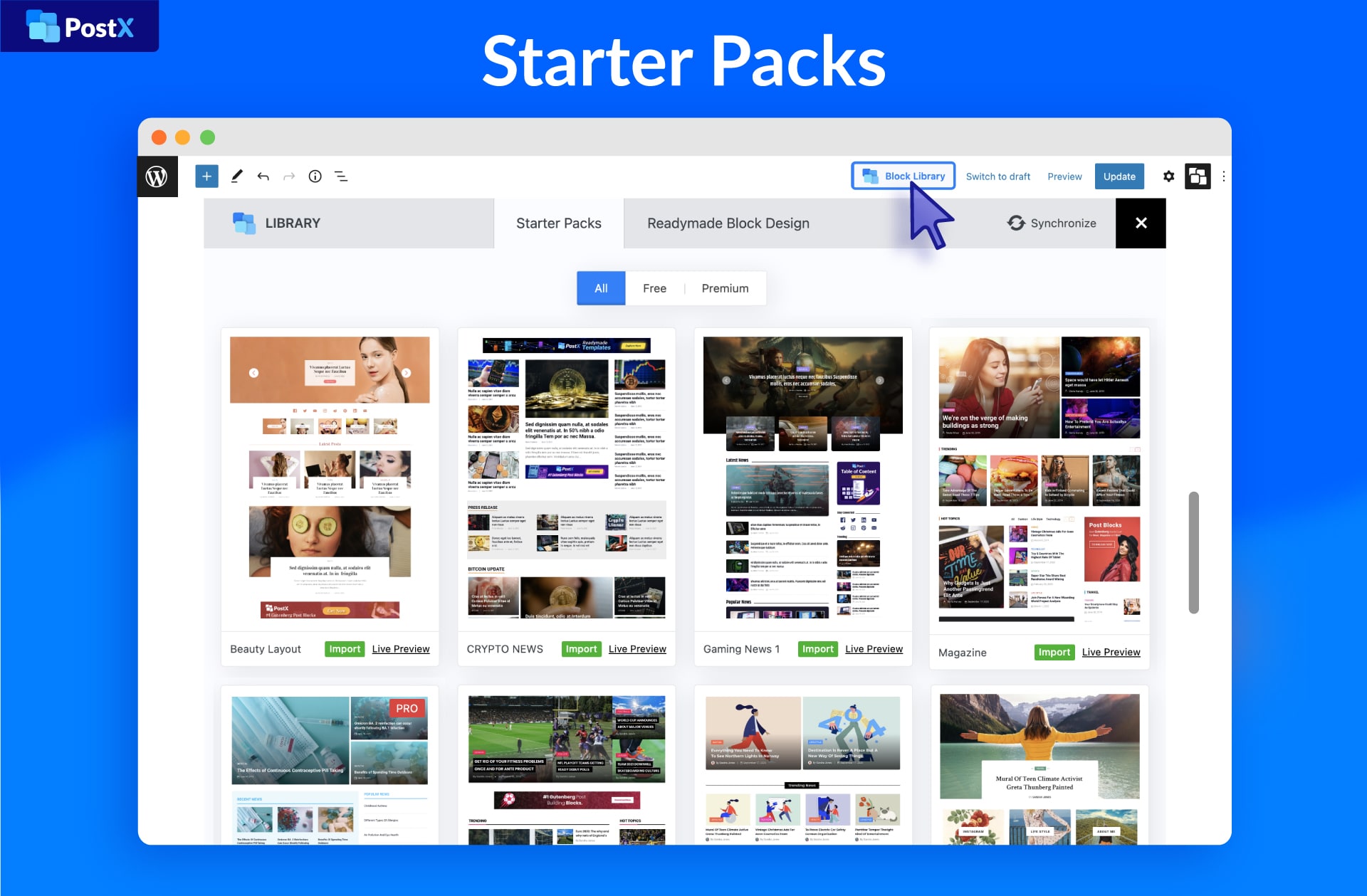
✅ Free Starter Sites: Import an available free starter site and customize its content and design.
✅ Free Templates and Patterns: Insert available free page templates and section designs into your layouts.
PostX Pro is a separate plugin that adds designs and blocks on top of the free plugin, including 189+ Pro patterns and 36 ready-to-import starter sites.
⭐ Premium Post Designs: 44+ grid, 46+ list and 17+ slider designs in the pattern library.
⭐ Extra Block Layouts: Additional layouts for the post grid, list, module, slider, taxonomy and dark/light blocks.
⭐ Premium Starter Sites: Import complete designs for news, magazine, travel, food, and other content websites.
⭐ Premium Templates and Patterns: Build sections with Pro patterns and additional page templates.
PostX Pro adds these features alongside the free blocks and builder.
⭐ Mega Menu: Add mega menu panels with custom layouts and content to the Menu block.
⭐ News Ticker Types: Add Marquee and Typewriter tickers and a sticky ticker position.
⭐ Quick Query: Use presets such as Trending Today, Weekly Popular Posts, Top of the Month, and Most Comments.
⭐ More Filters: Add search, advanced sort and custom taxonomy filters to the Advanced Filter block.
⭐ Infinite Scroll: Load additional posts as visitors scroll through supported post blocks.
⭐ Unique Content Groups: Prevent the same posts from appearing across multiple blocks.
⭐ Dynamic Content Integrations: Display field data from ACF, Meta Box, and Pods with Pro support.
⭐ Front End Post Submission: Let writers submit posts from the front end without using the WordPress dashboard.
⭐ Reading Progress Bar: Display a visual indicator of how far readers have scrolled.
⭐ Taxonomy Image and Color: Assign images and colors to categories, tags, and custom taxonomies.
⭐ SEO Plugin Integrations: Display meta descriptions from supported plugins, including Yoast, Rank Math, All-in-One SEO, SEOPress, and Squirrly.
Explore PostX Pro for the additional designs and features.
Build Where You Already Write: Build layouts in the WordPress editor.
Give Each Section a Clear Purpose: Organize stories into grids, lists, and topic sections.
Start with a Premade Design: Customize free designs or choose premium designs with Pro.
Customize Your Post Displays: Adjust block settings and preview responsive layouts.
Check out what Paul C (WPTuts) had to say about PostX.
Check out the video of Jack Cao and learn how to create a News Magazine Website for free.
Check out how Alyssa creates a complete news website in minutes using PostX.
PostX plugin is compatible with WPML Plugin and also it works perfectly with loco translate plugin.
You can Translate PostX on translate.wordpress.org.
Explore other WPXPO plugins for your website or WooCommerce store.
➕ WowAddons: Add product options and custom fields to WooCommerce products.
🎯 WowRecommend: Create WooCommerce product recommendations with flexible filters, sorting, and AI-assisted rule creation.
🧲 WowOptin: Create popups and opt-in forms.
💸 WowRevenue: Create WooCommerce discount campaigns and product offers.
📦 WholesaleX: Manage wholesale pricing and B2B selling in WooCommerce.
📄 WowInvoice: Create PDF invoices and packing slips for WooCommerce orders.
🚚 WowShipping: Set up table rate shipping rules for WooCommerce.
💝 WowStore: Build and customize WooCommerce store pages.
Developed by WPXPO. Contribute to Gutenberg Post Blocks on Bitbucket and join the party.
The matching human-readable JavaScript, React and stylesheet sources for this package are included in src/. The plugin root includes the build inputs: package.json, package-lock.json, webpack.config.js, gulpfile.mjs, generate-style-schema.cjs, .babelrc, tsconfig.json and eslint.config.mjs.
To rebuild the frontend, block editor, dashboard and setup assets, use a Node.js version matching the engines requirement in package.json, run npm ci, then run npm run build-release:ci. Run npm run build-package:ci to create the installable ZIP. These sources and build inputs travel with the package, including changes that have not yet reached a public repository branch.
The public development repository is available below. It can contain changes beyond this package; use the included sources when rebuilding this package:
https://bitbucket.org/wpstabon/ultimate-post/src/dev/
By default, PostX counts views on single-post pages and sets a first-party cookie named ultp_view_<post_id> for each viewed post. The cookie stores the value 1 and expires after 24 hours. The post ID is part of its name; it contains no visitor name or email address. While that cookie is present, repeat visits from the same browser do not increase that post’s counter. View totals are stored in post metadata in your WordPress database.
To stop PostX from setting new view-count cookies and updating these counters, open PostX > Settings > General Settings, enable „Disable Post View Cookies“, and click „Save Settings“. Existing cookies are not deleted by this setting; they expire after their original 24-hour lifetime or can be cleared in the browser.
When a visitor clicks the Dark/Light toggle, PostX sets a first-party preference cookie named ultplocalDLMode to ultpdark or ultplight. It remembers that choice for 60 days and contains no visitor name or email address. The browser uses the current hostname and the current page’s default directory path because PostX does not specify a Domain or Path attribute. This preference cookie is separate from post view counting and is not affected by „Disable Post View Cookies“. Changing the preference refreshes its 60-day lifetime; visitors can remove it through their browser’s cookie controls.
PostX sets two first-party cookies, described under „Cookies and post view counts“ above. It also contacts the external services listed below. Each entry under External services says when a request is made, what is sent, and links the service’s terms and privacy policy.
Social share buttons open the sharing site only when a visitor clicks one. Nothing is sent before the click.
Activation and the PostX dashboard Home screen do not automatically request the WPXPO template catalogue or its remote preview images. Template-screen requests, opt-in Google Fonts, configured YouTube and Vimeo media, and remote media retained in imported content are described below.
PostX connects to the services below. Each entry says when, what is sent, and links the service’s terms and privacy policy.
Starter sites, patterns, designs and premade builder templates are loaded from postxkit.wpxpo.com, a WPXPO service. The library is large and updated regularly, so it is hosted on this service and loaded when you open these screens; they have nothing to show without it. PostX contacts it only when you open one of these screens yourself:
It is also contacted when you preview or import an item from those screens. It is not contacted on activation, on the dashboard Home screen, on other dashboard tabs, in the background, or on your site’s front end. Lists are cached locally; a missing or empty list is fetched when you open one of the screens above, and a starter-site cache at least two days old is refreshed when you open one of them.
The starter-site list and the premade design list come from two different addresses. Your server requests each one separately and saves the answer in wp-content/uploads/ultp/:
Previewing or importing a single item uses further requests to the same host: https://postxkit.wpxpo.com/wp-json/restapi/v2/single-template and https://postxkit.wpxpo.com/wp-json/restapi/v2/single-design from your browser, and https://postxkit.wpxpo.com/<starter-site>/wp-json/importer/single and .../importer/site_all_posts from your server. PostX sends these requests only to the postxkit.wpxpo.com host, over HTTPS.
The data sent depends on the request: starter-site list and content requests include the PostX version; individual template and design requests include the selected item ID; import requests can also include a request type. The selected starter site is identified by its service URL. When PostX Pro is active, applicable import and editor requests may also include its stored licence key. The editor licence field is otherwise empty. The design-list request has no PostX request body. PHP requests also use WordPress’s default HTTP User-Agent, which includes the WordPress version and site URL; the service receives the server’s IP address and normal request headers.
Your browser requests preview images only on the screens listed above, as those images render, before an import is selected. Clicking a starter site to preview it loads that site’s live demo in a frame from postxkit.wpxpo.com. Direct browser requests expose the browser’s IP address and standard HTTP request information, which may include the referring page. Imported content can retain remote image or media URLs; viewing that content can continue to contact the corresponding host after import. Starter-site imports can also install plugins from WordPress.org (see below). Terms | Privacy Policy
When you import a starter site with „Install required plugins“ ticked (the plugins are listed first), PostX downloads those plugins from WordPress.org through WordPress’s own installer and activates them. PostX identifies each required plugin by its slug and uses WordPress’s standard plugin-information and download requests. WordPress.org receives the server’s IP address and normal WordPress HTTP headers, which can include the WordPress version and site URL. The dashboard’s „Our Plugins“ tab installs nothing: its Install and Activate buttons open WordPress’s own plugin screens, where you choose what to do. WordPress.org Privacy Policy
Remote Google Fonts are off by default, including on upgrades. PostX sends no request to Google until you turn on „Enable Remote Google Fonts“ in PostX settings. After you turn it on, pages, the editor, and font previews that use Google Fonts may request stylesheets from fonts.googleapis.com and font files from fonts.gstatic.com. Each of these requests sends the visitor’s IP address and standard browser request information, plus the requested font family and variants. No Google account is required. Turn the setting off to stop PostX from generating or outputting these remote font requests, and clear any page or CDN caches after changing it. System fonts and fonts you upload locally remain available without this setting; PostX does not automatically download Google Fonts for local hosting. Google Fonts Terms | Google Terms of Service | Google Privacy Policy | Google Fonts privacy FAQ
Dashboard, setup-wizard and tutorial help videos load their YouTube player after you click play. Configured YouTube Gallery blocks behave differently: opening their editor preview or rendering them on your site can automatically request video data from www.googleapis.com/youtube/v3/ and thumbnails from YouTube image hosts such as img.youtube.com and i.ytimg.com, before a visitor presses play. The Data API requests include the configured API key and channel or playlist ID, or the configured handle as a channel-search query, together with request/count options. Cached video lists can reduce some API requests but do not always prevent channel lookups.
Gallery players can load while previewing a configured gallery, depending on its layout and playback settings; popup players load when selected. The editor’s YouTube player URL explicitly includes the editor site’s origin (scheme, hostname and port). Browser API, thumbnail and player requests expose the browser’s IP address and standard HTTP information, which may include the referring page. A YouTube account is not required for visitors to view a configured gallery.
Post blocks that show a featured YouTube video can also ask WordPress to fetch oEmbed metadata while the page is rendered, before playback, unless a cached …
Beschreibung veröffentlicht von WPXPO auf WordPress.org, lizenziert unter GPLv3.
Tags
blog post grid
post carousel
post display
post grid
post slider
Screenshots
Screenshots veröffentlicht von WPXPO auf WordPress.org, lizenziert unter GPLv3.
Historie nach Version
Versionsdetails anzeigen (1 Version)
Historie nach Version
Versionsdetails anzeigen (1 Version)
Wie sich das Plugin von Version zu Version entwickelt.
| Version | Homepage | Admin | Letzter Scan |
|---|---|---|---|
| v5.1.8 | — | 1 Scan | vor 1 Tag |
Alternativen in derselben Kategorie
Weitere Plugins der Kategorie media, von der Community gemessen, vom leichtesten zum schwersten sortiert.
Noch nicht genug Scans für eine Bewertung (1 erhalten).
Noch nicht genug Scans für eine Bewertung (1 erhalten).
Noch nicht genug Scans für eine Bewertung (3 erhalten).
Noch nicht genug Scans für eine Bewertung (2 erhalten).
Noch nicht genug Scans für eine Bewertung (3 erhalten).
Scan-Verlauf
Einzelnes Scan-Protokoll anzeigen (1 Scans)
Scan-Verlauf
Einzelnes Scan-Protokoll anzeigen (1 Scans)
| Datum | Version | Kontext | Score | Bewertung | Zeit | Speicher |
|---|---|---|---|---|---|---|
| vor 1 Tag | v5.1.8 | Admin | 92/100 | A | 72 ms | 0.0 MB |