


- Temps
- 0 ms
- Mémoire
- 0.0 MB
- SQL
- +5
À propos
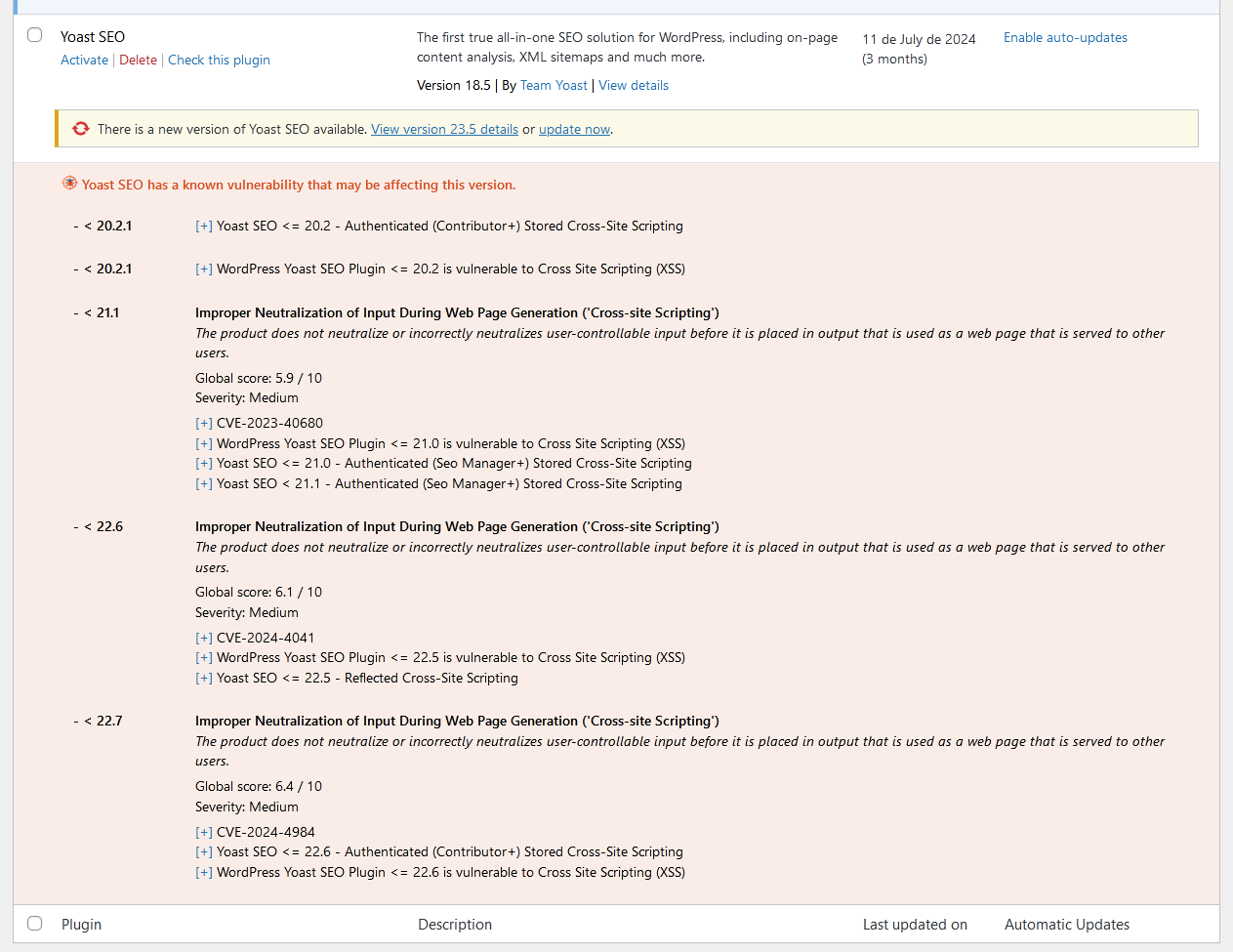
This plugin integrates with the WPVulnerability API to provide real-time vulnerability assessments for your WordPress core, plugins, themes, PHP version, Apache HTTPD, nginx, MariaDB, MySQL, ImageMagick, curl, memcached, Redis, and SQLite.
It delivers detailed reports directly within your WordPress dashboard, helping you stay aware of potential security risks. Configure the plugin to send periodic notifications about your site’s security status, ensuring you remain informed without being overwhelmed. Designed for ease of use, it supports proactive security measures without storing or retrieving any personal data from your site.
The information provided by the information database comes from different sources that have been reviewed by third parties. There is no liability of any kind for the information. Act at your own risk.
Lire la suite Réduire
You can use the following WP-CLI commands to manage and check vulnerabilities:
To configure the plugin you can use:
All commands support the --format option to specify the output format:
Need help?
The WPVulnerability plugin provides several REST API endpoints to fetch vulnerability information for different components of your WordPress site.
The WPVulnerability REST API uses Application Passwords for authentication. You need to include a valid Application Password in the Authorization header of your requests.
Example Request with Authentication
curl -X GET https://example.com/wp-json/wpvulnerability/v1/plugins -u username:application_password
Replace username with your WordPress username and application_password with your Application Password.
If, for some reason, you need the emails sent by the plugin to have a From different from the site administrator, you can change it from the wp-config.php by adding a constant:
define( 'WPVULNERABILITY_MAIL', '[email protected]' );
If the constant is active, it will be visible in the configuration screen.
If you want to always hide a specific component, you can define a constant in wp-config.php. When set to true, the option will be checked automatically in the settings screen and the related analysis will be skipped.
Example:
define( 'WPVULNERABILITY_HIDE_APACHE', true );
Available constants: WPVULNERABILITY_HIDE_CORE, WPVULNERABILITY_HIDE_PLUGINS, WPVULNERABILITY_HIDE_THEMES, WPVULNERABILITY_HIDE_PHP, WPVULNERABILITY_HIDE_APACHE, WPVULNERABILITY_HIDE_NGINX, WPVULNERABILITY_HIDE_MARIADB, WPVULNERABILITY_HIDE_MYSQL, WPVULNERABILITY_HIDE_IMAGEMAGICK, WPVULNERABILITY_HIDE_CURL, WPVULNERABILITY_HIDE_MEMCACHED, WPVULNERABILITY_HIDE_REDIS, WPVULNERABILITY_HIDE_SQLITE.
By default, data from the API is cached for 12 hours. To change this, define WPVULNERABILITY_CACHE_HOURS in wp-config.php with one of 1, 6, 12 or 24. This value overrides the setting screen and WP-CLI command.
define( 'WPVULNERABILITY_CACHE_HOURS', 24 );
Log rotation (since: 4.2.0)
WPVulnerability stores the most recent API responses so you can review recent calls from the new log tab. Define WPVULNERABILITY_LOG_RETENTION_DAYS in wp-config.php to control how many days of entries are preserved. Supported values are 0, 1, 7, 14 or 28; using 0 disables logging entirely.
define( 'WPVULNERABILITY_LOG_RETENTION_DAYS', 14 );
When the constant is present its value is enforced in the settings UI and through WP-CLI, ensuring consistent log rotation across environments.
WPVulnerability uses a hybrid detection approach for server software (ImageMagick, Redis, Memcached, SQLite): PHP extensions first (most secure), then shell commands as fallback (most accurate). You can control this behavior using security configuration constants in wp-config.php.
Global disable of shell commands:
define( 'WPVULNERABILITY_DISABLE_SHELL_EXEC', true );
Completely disables shell command usage. Falls back to PHP extensions only. Use for maximum security when accuracy loss is acceptable.
Security mode (standard/strict/disabled):
define( 'WPVULNERABILITY_SECURITY_MODE', 'strict' );
standard– Hybrid detection: PHP extensions first, shell commands fallback (default, best accuracy)strict– PHP extensions only, no shell commands (high security, lower accuracy)disabled– No software detection at all (maximum security)
Component whitelist:
define( 'WPVULNERABILITY_SHELL_EXEC_WHITELIST', 'imagemagick,redis' );
Allows shell commands only for specified components. Available components: imagemagick, redis, memcached, sqlite. Use for granular control.
Examples:
Maximum security (no shell commands):
define( 'WPVULNERABILITY_SECURITY_MODE', 'strict' );
Only allow ImageMagick shell detection:
define( 'WPVULNERABILITY_SHELL_EXEC_WHITELIST', 'imagemagick' );
Complete disable:
define( 'WPVULNERABILITY_DISABLE_SHELL_EXEC', true );
All shell commands are hardcoded and validated – no user input is involved. Commands are logged for security auditing.
This plugin adheres to the following security measures and review protocols for each version:
Found a security vulnerability? Please report it to us privately at ROBOTSTXT.
You can contribute to this plugin at the WPVulnerability repository.
Description publiée par ROBOTSTXT.es sur WordPress.org, sous licence GPL-3.0-or-later.
Tags
security
site health
vulnerability
Captures d'écran
Captures publiées par ROBOTSTXT.es sur WordPress.org, sous licence GPL-3.0-or-later.
Alternatives dans la même catégorie
D'autres plugins security mesurés par la communauté, classés du plus léger au plus lourd.
Pas encore assez de scans pour publier le score (3 reçus).
Pas encore assez de scans pour publier le score (1 reçus).
Pas encore assez de scans pour publier le score (1 reçus).
Pas encore assez de scans pour publier le score (1 reçus).
Pas encore assez de scans pour publier le score (4 reçus).