



Noch nicht genug Scans für eine Bewertung (3 erhalten).
Über
A free, lightweight and easy to use plugin that allows you to seamlessly replace an image or file in your Media Library by uploading a new file in its place. No more deleting, renaming and re-uploading files! Now fully compatible with WP Offload Media!
New beta feature! You can now remove the background of your images for better integration with eCommerce solutions!
Supported by the friendly team that created ShortPixel 🙂
Findest du es nicht auch mühsam und kompliziert, eine Datei zuerst löschen zu müssen und dann eine mit genau dem gleichen Namen hochzuladen, wenn du ein Bild oder einen andere Datei in der WordPress-Mediathek aktualisieren möchtest?
Nicht mehr!
Mehr lesen Weniger anzeigen
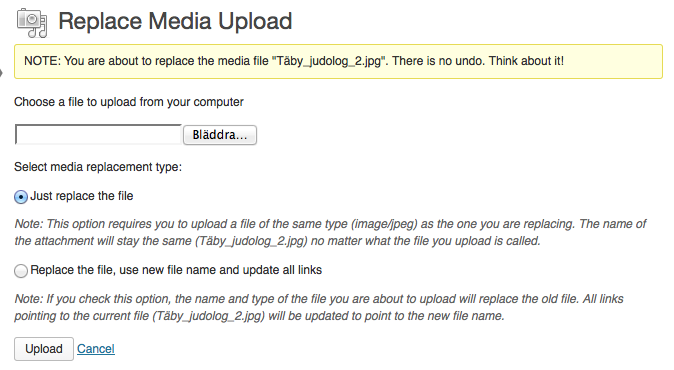
Now you can replace any uploaded file in the Edit Media view, where it should be. Replacing Media can be done in two ways:
Dies ist ein sehr mächtiges Plugin und unverzichtbar für jede größere WordPress-Website. Jetzt auch mit Vorschau des ersetzenden Bildes!
Similar to replacing media, you can also remove the background of the images from the Media Library! The background removal feature sends the images to ShortPixel’s API, removes the background and sends them back in a preview window. If everything looks good, just replace the image with the one that has the background removed! If the source image is a PNG file, you will get a transparent background, while the other images default to a solid white background. You also have the option to choose a different color with an embedded color picker.
The background removal feature is still in beta and will be free of charge for a reasonable usage.
If you don’t want to use the background removal feature, add this line to your theme’s functions.php file, or use a plugin like Code Snippets:
`add_filter( 'emr/feature/background', '__return_false' );```
A similar filter, for the remote notification system is:
`add_filter( 'emr/feature/remote_notice', '__return_false' );```
To shorten the wait time before redirecting to the media editing screen, use the following filter and specify the wait time in seconds (0 means that redirection is immediate, but may cause problems in certain configurations):
`add_filter('emr/success/timeout', function () { return 3; });```
To set „Just replace the file“ as the default replacing method, use the following filter:
`add_filter( 'emr/replace/default_type', function() {
return 'replace';
} );„`
To set „Replace the file, use the new file name, and update all links“ as the default replacing method, use the following filter:
`add_filter( 'emr/replace/default_type', function() {
return 'replace_and_search';
} );„`
Es gibt einen Shortcode, der das Datum der letzten Dateiänderung in einer Seite oder einem Beitrag anzeigt Der Code ist:
[file_modified id=XX format=XXXX] wobei „id“ eine Pflichtangabe ist und „format“ optional. Standardmäßig ist dies das Datums-/Zeitformat deiner WordPress-Installation.
Der Code [file_modified id=870] z. B. würde anzeigen, wann die Datei mit der ID 870 das letzte mal aktualisiert wurde. Um die ID einer Datei herauszufinden, schaue in die URL, wenn du die Datei in den Mediathek bearbeitest (siehe Screenshot Nummer #4).
Wenn du mehr Kontrolle darüber haben möchtest, in welchem Format das Datum angezeigt werden soll, benutze die Format-Option. Beispielsweise würde [file_modified id=870 format=Y-m-d] das Datei-Änderungsdatum anzeigen, nicht jedoch die Uhrzeit. Die Format-Option benutzt die Standard-Tags der PHP-Funktion date().
Weitere Plugins von ShortPixel:
Get in touch!
Hast du Verbesserungsvorschläge? Zögere nicht, ShortPixel hier zu kontaktieren.
Wenn du uns dabei helfen möchtest, das Plugin zu verbessern, freuen wir uns hier auf deine Pull Requests via GitHub.
Beschreibung veröffentlicht von ShortPixel auf WordPress.org, lizenziert unter GPLv2 or later.
Tags
change media
remove background
replace
replace image
replace jpg
Screenshots
Screenshots veröffentlicht von ShortPixel auf WordPress.org, lizenziert unter GPLv2 or later.
Alternativen in derselben Kategorie
Weitere Plugins der Kategorie media, von der Community gemessen, vom leichtesten zum schwersten sortiert.
Noch nicht genug Scans für eine Bewertung (1 erhalten).
Noch nicht genug Scans für eine Bewertung (3 erhalten).
Noch nicht genug Scans für eine Bewertung (1 erhalten).
Noch nicht genug Scans für eine Bewertung (3 erhalten).
Noch nicht genug Scans für eine Bewertung (2 erhalten).