



Ancora troppe poche scansioni per pubblicare il punteggio (1 ricevute).
Informazioni
A free, lightweight and easy to use plugin that allows you to seamlessly replace an image or file in your Media Library by uploading a new file in its place. No more deleting, renaming and re-uploading files! Now fully compatible with WP Offload Media!
New beta feature! You can now remove the background of your images for better integration with eCommerce solutions!
Supported by the friendly team that created ShortPixel 🙂
Don’t you find it tedious and complicated to first delete a file and then upload another one with the exact same name every time you want to update an image or other uploaded file in the WordPress media library?
Bene, non più!
Leggi tutto Mostra meno
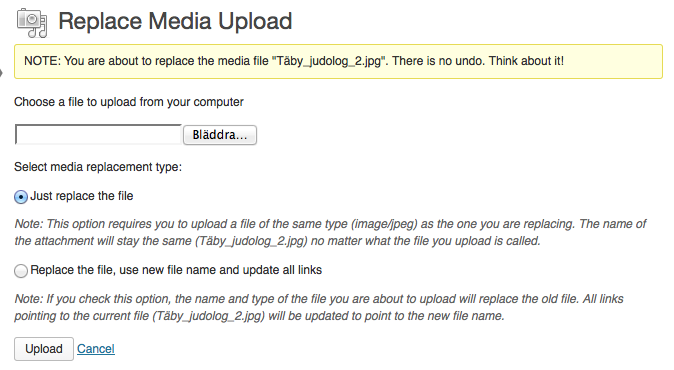
Now you can replace any uploaded file in the Edit Media view, where it should be. Replacing Media can be done in two ways:
This plugin is very powerful and a must-have for all major websites built with WordPress. It also offers a preview of the replaced image!
Similar to replacing media, you can also remove the background of the images from the Media Library! The background removal feature sends the images to ShortPixel’s API, removes the background and sends them back in a preview window. If everything looks good, just replace the image with the one that has the background removed! If the source image is a PNG file, you will get a transparent background, while the other images default to a solid white background. You also have the option to choose a different color with an embedded color picker.
The background removal feature is still in beta and will be free of charge for a reasonable usage.
If you don’t want to use the background removal feature, add this line to your theme’s functions.php file, or use a plugin like Code Snippets:
`add_filter( 'emr/feature/background', '__return_false' );```
A similar filter, for the remote notification system is:
`add_filter( 'emr/feature/remote_notice', '__return_false' );```
To shorten the wait time before redirecting to the media editing screen, use the following filter and specify the wait time in seconds (0 means that redirection is immediate, but may cause problems in certain configurations):
`add_filter('emr/success/timeout', function () { return 3; });```
To set “Just replace the file” as the default replacing method, use the following filter:
`add_filter( 'emr/replace/default_type', function() {
return 'replace';
} );“`
To set “Replace the file, use the new file name, and update all links” as the default replacing method, use the following filter:
`add_filter( 'emr/replace/default_type', function() {
return 'replace_and_search';
} );“`
There is a shortcode that takes the file modification date and displays it in a post or on a page. The code is:
[file_modified id=XX format=XXXX] where the “id” is required and the “format” is optional and defaults to your current WordPress settings for date and time format.
So [file_modified id=870] would show the last time the file with ID 870 was updated on your site. To get the ID for a file, check the URL when editing a file in the media library (see screenshot #4)
If you want more control over the format in which the time is shown, you can use the format option. So [file_modified id=870 format=Y-m-d] would show the date the file was modified but not the time. The format string uses the standard PHP date() formatting tags.
Other plugins by ShortPixel:
Get in touch!
Hai dei suggerimenti? Contatta liberamente ShortPixel qui
Se vuoi aiutarci a migliorare il plugin puoi inviare delle PR sul nostro repo GitHub.
Descrizione pubblicata da ShortPixel su WordPress.org, con licenza GPLv2 or later.
Tag
change media
remove background
replace
replace image
replace jpg
Schermate
Schermate pubblicate da ShortPixel su WordPress.org, con licenza GPLv2 or later.
Alternative nella stessa categoria
Altri plugin media misurati dalla community, ordinati dal più leggero al più pesante.
Ancora troppe poche scansioni per pubblicare il punteggio (3 ricevute).
Ancora troppe poche scansioni per pubblicare il punteggio (2 ricevute).
Ancora troppe poche scansioni per pubblicare il punteggio (3 ricevute).
Ancora troppe poche scansioni per pubblicare il punteggio (1 ricevute).
Ancora troppe poche scansioni per pubblicare il punteggio (3 ricevute).