
Auswirkungsbewertung
Footprint Score in den beiden repräsentativsten Kontexten.
1 Scans · letzter Scan vor 1 Monat
Homepage-Score
Auswirkung auf der öffentlichen Startseite
v3.1.2 · 1 Scan · Konsolidierte Bewertung über 90 Tage · 1 Versionen
Was bei jedem Seitenaufruf hinzukommt
- Zusätzliche Zeit
- 0 ms
- Zusätzlicher Speicher
- 0.0 MB
- SQL-Abfragen
- +0
- CSS/JS-Dateien
- +0
- Externe Aufrufe
- 0
Admin-Score
Auswirkung im WordPress-Admin
Über
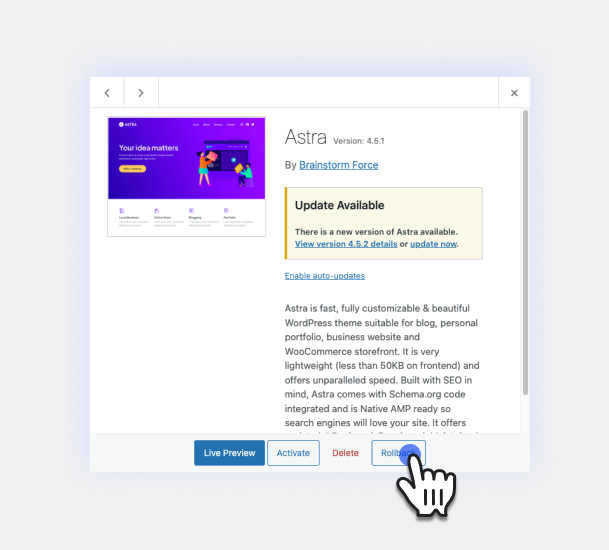
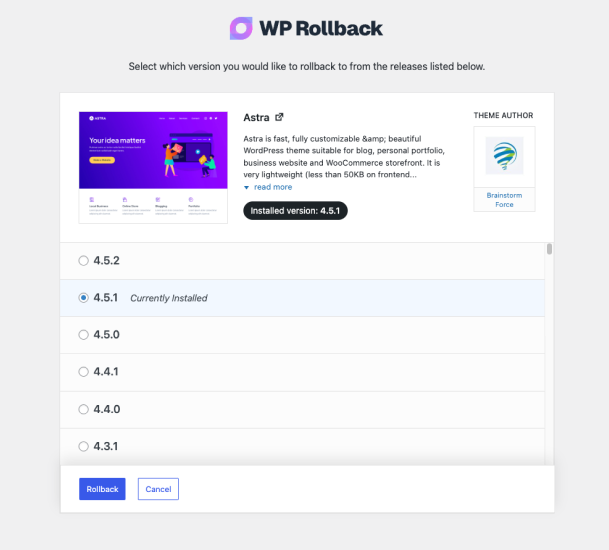
Quickly and easily roll back any theme or plugin from WordPress.org to any previous (or newer) version without any of the manual fuss. Works just like the plugin updater, except you’re rolling back (or forward) to a specific version. No need for manually downloading and FTPing the files or learning Subversion. This plugin takes care of the trouble for you.
While it’s considered best practice to always keep your WordPress plugins and themes updated, we understand there are times you may need to quickly revert to a previous version. This plugin makes that process as easy as a few mouse clicks. Simply select the version of the plugin or theme that you’d like to roll back to, confirm, and in a few moments you’ll be using the version requested. No more fumbling to find the version, downloading, unzipping, FTPing, learning Subversion or hair pulling.
For advanced features including rollback support for premium plugins and themes you already have licensed and installed (Elementor Pro, Gravity Forms, WooCommerce extensions, Kadence Pro, Astra Pro, GeneratePress Premium, Divi, Envato/ThemeForest products, and more), comprehensive activity logging, multisite network management, and priority support, consider upgrading to WP Rollback Pro.
Mehr lesen Weniger anzeigen
Wichtiger Haftungsausschluss: Dieses Plugin darf nicht verwendet werden, ohne dass zuvor die entsprechenden Vorsichtsmaßnahmen getroffen wurden, um Datenverlust oder Ausfallzeiten der Website auszuschließen. Stelle immer sicher, dass du das Rollback zuerst auf einer Staging- oder Entwicklungs-Website getestet hast, bevor du WP Rollback auf einer Live-Website verwendest.
Wir geben keine (null) Zusicherungen, Garantien oder Gewährleistungen, dass die Plugin-, Theme- oder WordPress-Version, auf die du ein Downgrade vornimmst, so funktioniert, wie du es erwartest. Die Verwendung dieses Plugins erfolgt auf dein eigenes Risiko.
Do you speak another language? Want to contribute in a meaningful way to WP Rollback? There’s no better way than to help us translate the plugin. This plugin is translation ready. Simply header over to the WP Rollback translation project that’s powered by WordPress.org volunteer translators. There you can contribute to the translation of the plugin into your language.
We answer all free user support requests on the WordPress.org support forum. For pro users, please submit your questions to WP Rollback Pro support.
WP Rollback was created to be as intuitive to the natural WordPress experience as possible. We believe that once you activate WP Rollback, you’ll quickly discover exactly how it works without question.
ABER!
We do have documentation on our website. See WP Rollback Documentation.
Besides WordPress.org, where it finds plugin and theme versions, WP Rollback connects to one service, and only when you ask it to.
WP Rollback newsletter (wprollback.com)
After a rollback, at the end of the 1-minute tour, and on the WP Rollback dashboard, you can subscribe to the WP Rollback newsletter: tips for safer WordPress updates, WP Rollback news, and the occasional deal. Nothing is sent unless you click Subscribe. When you do, your site sends the email address you entered and where the form was (for example, „free-plugin-rollback-complete“) to https://wprollback.com/wp-json/wp-rollback/v1/subscribe, which also sees your server’s IP address. You’ll get an email asking you to confirm, and every email has a link to unsubscribe.
Click „No thanks“ to hide the form. To hide it for every user, return false from the wpr_newsletter_signup_enabled filter.
Beschreibung veröffentlicht von Devin Walker auf WordPress.org, lizenziert unter GPLv3.
Screenshots
Screenshots veröffentlicht von Devin Walker auf WordPress.org, lizenziert unter GPLv3.
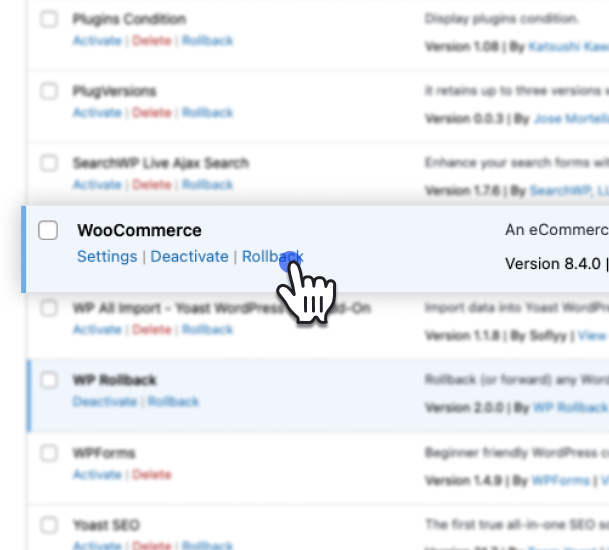
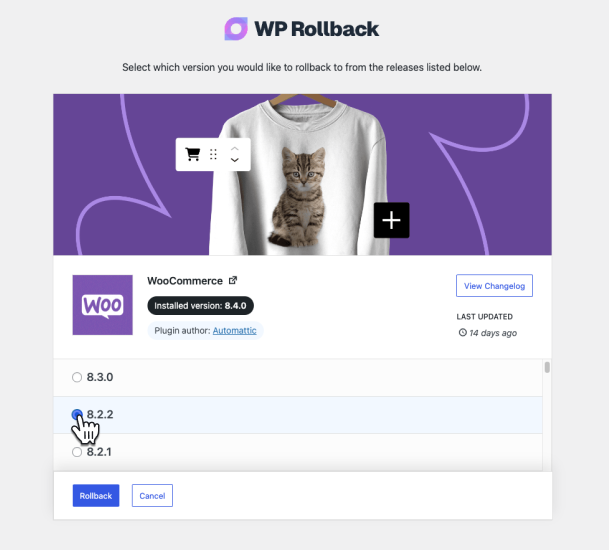
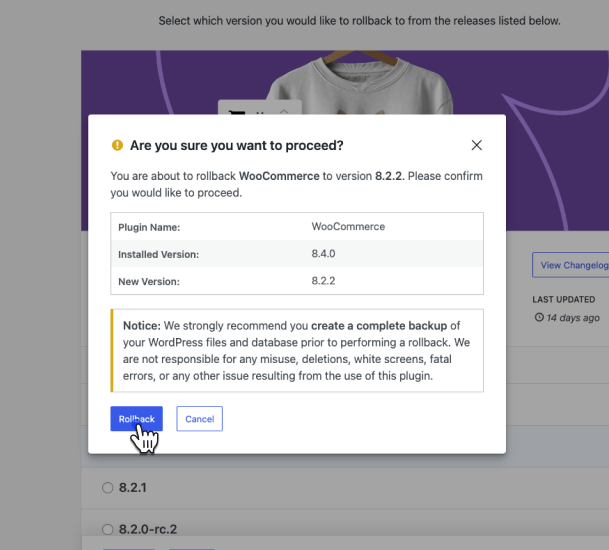
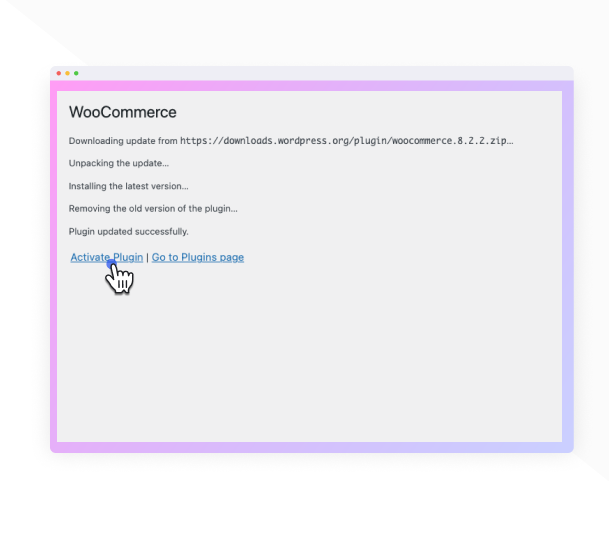
Historie nach Version
Versionsdetails anzeigen (1 Version)
Historie nach Version
Versionsdetails anzeigen (1 Version)
Wie sich das Plugin von Version zu Version entwickelt.
| Version | Homepage | Admin | Letzter Scan |
|---|---|---|---|
| v3.1.2 | 1 Scan | — | vor 1 Monat |
Scan-Verlauf
Einzelnes Scan-Protokoll anzeigen (1 Scans)
Scan-Verlauf
Einzelnes Scan-Protokoll anzeigen (1 Scans)
| Datum | Version | Kontext | Score | Bewertung | Zeit | Speicher |
|---|---|---|---|---|---|---|
| vor 1 Monat | v3.1.2 | Homepage | 100/100 | A | 0 ms | 0.0 MB |